- Home Page /
- Electronics /
- Computer Accessories /
- Computer Accessories & Peripherals /
- Keyboards, Mice & Accessories /
- Mice /
- Rapoo Bluetooth Wireless Mouse, 4 Adjustable ...
0 ratings




Item #:
33050822
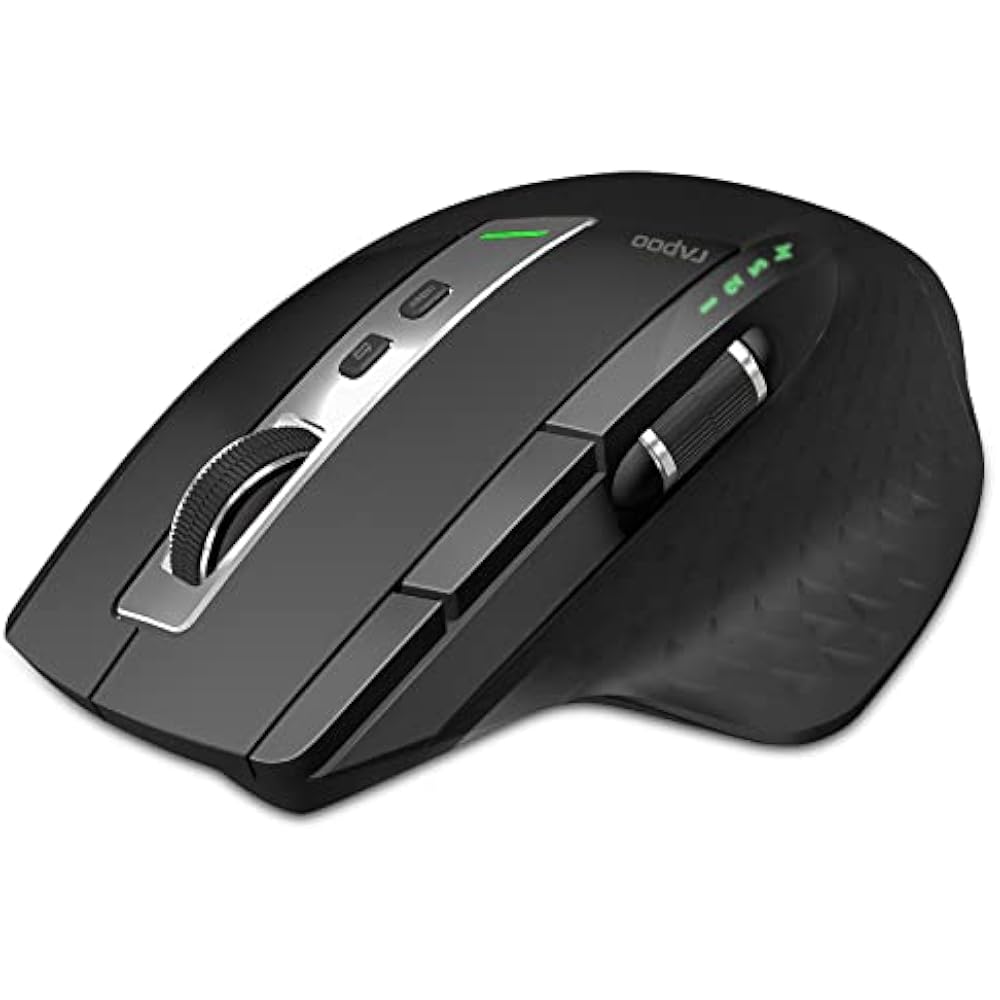
Rapoo Bluetooth Wireless Mouse, 4 Adjustable DPI Rechargeable, Multi-Device (3 Bluetooth+USB) Programmable Ergonomic Mouse with Side Roller, Laser
Item #:
33050822
DKK 321
Price Details
Excluding Shipping & Custom charges ( Shipping and custom charges will be calculated on checkout )
*All items will import from US
35%
0 ratings
Write a review
In stock
 Imported from USA store
QTY:
Order now and get it around Wednesday, June 24
Secured transaction
Ubuy works hard to protect your security and privacy. Our advanced payment security system ensures confidentiality by encrypting your information during transmission using AES (Advanced Encryption Standards) and SSL (Secure Socket Layer) protocols. Your payment details are 100% secure as we do not share your payment details with third party sellers.
Our Top Logistics Partners


RAPOO Bluetooth Wireless Mouse with adjustable DPI, Multi-Device (3 Bluetooth+USB) Programmable Ergonomic Mouse with Side Roller and laser mouse technology can be more accurate positioning

Buy Now Pay Later

Fast
Shipping

Free
Return*

Secure Packaging

100% Original Products

PCI DSS Compliance

ISO 27001 Certified


Note: Step Down Voltage Transformer required for using electronics products of US store (110-120). Recommended power converters Buy Now.


What Stands Out
Multi-Device Connectivity
Seamlessly connects to three devices via Bluetooth and USB, allowing effortless switching between laptop, desktop, and tablet without the hassle of re-pairing.
Adjustable DPI Levels
Features four customizable DPI settings for precise tracking and speed adjustment, catering to different tasks from gaming to graphic design, ensuring optimal performance.
Ergonomic Design
Designed for comfort, this mouse features an ergonomic shape that reduces hand fatigue during long working sessions, making it ideal for professionals and gamers alike.
Product Details
- Multi-device wireless mouse with Bluetooth and USB connectivity
- Adjustable DPI and laser technology for precise tracking
- Rechargeable battery with long standby time
- Ergonomic design with palm and thumb rest for comfort
- Programmable buttons for customization
- Compatible with Windows and Mac operating systems
| Connectivity Technology | Radio Frequency, USB |
| Additional Features | 4 Adjustable DPI, 8 Programmable Buttons, Connect Up to 4 Devices, Ergonomic Design, Rechargeable |
| Movement Detection | Laser |
| Button Quantity | 8 |
| Hand Orientation | Right |
| Compatible Devices | Personal Computer |
| Operating System | Windows |
| Battery Average Life | 3 months |
| Number of Batteries | 1 Lithium Ion batteries required. (included) |
| Hardware Platform | Linux, Mac, PC |
| Power Source | Battery Powered |
| Mouse Maximum Sensitivity | 3200 Dots per Inch (8128 cm) |
| Range | 10 Meters |
| Color | Matte Black |
| Style Name | MT750S |
| Theme | office |
| Enclosure Material | Glass |
| Brand | Rapoo |
| Model Name | MT750S |
| Antenna Location | Office |
| Model Number | MT750S |
| Built-In Media | Rechargeable battery, USB-B cable, Nano USB Receiver |
| Are Batteries Included | Yes |
| Are Batteries Required | Yes |
| Manufacturer | Shenzhen Rapoo Technology Co., Ltd. |
| Mfr Part Number | Mice |
| Item Type Name | Computer Mice |
| Item Weight | 116 Grams |
| Item Dimensions L x W | 4.8"L x 3.35"W (12.2 cm) |
| Unit Count | 1.0 Count |
| Special Feature | 4 Adjustable DPI, 8 Programmable Buttons, Connect Up to 4 Devices, Ergonomic Design, Rechargeable |
| Movement Detection Technology | Laser |
What's in the box
Rechargeable battery, USB-B cable, Nano USB Receiver
Who Should Buy?

-
Multi-Device Users
Ideal for individuals who frequently switch between multiple devices, supporting three Bluetooth connections and USB interface.
-
Ergonomic Seekers
Perfect for users prioritizing comfort, featuring an ergonomic design to reduce wrist strain during extended use.
-
Precision Workers
Great for tasks requiring precision, with four adjustable DPI settings for tailored sensitivity in various applications.

-
Budget Buyers
Not ideal for users looking for a lower-cost mouse, as it may be priced higher compared to basic models.
-
Gaming Enthusiasts
May not meet the needs of hardcore gamers, lacking specialized features like customizable macros and ultra-fast response time.
-
Non-Bluetooth Users
Unsuitable for those without Bluetooth connectivity, as its features heavily rely on wireless capabilities for functioning.
Product Description
Have any Query? Chat with us
Customer Questions & Answers
-
Question:
What are the key features of the Rapoo Bluetooth Wireless Mouse?
Answer: The Rapoo Bluetooth Wireless Mouse boasts several standout features, including 4 adjustable DPI settings, allowing you to switch between different sensitivity levels for precise control. It's equipped for multi-device connectivity with Bluetooth and USB capabilities, enabling seamless transitions between various devices. The ergonomic design ensures comfort even during prolonged use, while the side roller provides additional navigation ease. These features make it ideal for professionals and gamers alike, who need responsive and versatile tools for their computing tasks. -
Question:
How do I connect the Rapoo Bluetooth Wireless Mouse to multiple devices?
Answer: To connect the Rapoo Bluetooth Wireless Mouse to multiple devices, first, ensure the mouse is powered on. Then, activate Bluetooth on the device you want to connect. Press the pairing button on the mouse, and it will enter pairing mode, allowing your device to discover it. Once connected, you can switch between devices effortlessly using the designated button on the mouse. This functionality is perfect for users who regularly alternate between a laptop and a tablet, enhancing productivity and convenience. -
Question:
What does the DPI setting on the Rapoo Bluetooth Mouse mean?
Answer: DPI, or dots per inch, measures the mouse's sensitivity. The Rapoo Bluetooth Wireless Mouse features 4 adjustable DPI settings, which can be switched easily. Higher DPI settings allow for faster cursor movement across the screen, making it ideal for gaming and graphic design. Conversely, lower DPI settings provide greater precision for tasks like photo editing or detailed scrolling. This flexibility allows users to customize their experience based on the tasks at hand, enhancing overall efficiency. -
Question:
Is the Rapoo Bluetooth Wireless Mouse rechargeable?
Answer: Yes, the Rapoo Bluetooth Wireless Mouse is rechargeable, which eliminates the need for frequent battery replacements. Simply use the included USB charging cable to recharge the mouse when the battery is low. The convenience of a rechargeable battery means you can enjoy uninterrupted use without the hassle of running out of batteries. It’s especially useful for avid users who rely on their mouse for extended periods, ensuring continuous performance during critical tasks. -
Question:
What is the ergonomic design of the Rapoo Bluetooth Mouse?
Answer: The ergonomic design of the Rapoo Bluetooth Wireless Mouse is carefully crafted to reduce wrist strain and enhance comfort during prolonged usage. The natural shape fits the hand snugly, providing support and preventing fatigue commonly associated with long hours of computer work. This design is beneficial for users like programmers, writers, and gamers who spend extensive time on their devices. A comfortable mouse can significantly improve your overall productivity and satisfaction while using it. -
Question:
Can I customize the buttons on the Rapoo Bluetooth Wireless Mouse?
Answer: Yes, the Rapoo Bluetooth Wireless Mouse allows you to program its buttons for customized functionality. With the appropriate software, users can assign specific commands or shortcuts to the mouse buttons, streamlining tasks based on personal preferences. This feature is particularly advantageous for professionals who want to enhance their workflow, such as graphic designers who require quick access to tools or gamers needing rapid commands at their fingertips. -
Question:
What is the difference between Bluetooth and USB connections on this mouse?
Answer: The Rapoo Bluetooth Wireless Mouse can connect via Bluetooth or USB, each serving distinct purposes. Bluetooth allows for a wireless connection without a dongle, which is perfect for devices lacking USB ports or for users who prefer a clutter-free workspace. The USB option is typically more straightforward for plug-and-play use, offering a stable connection for devices that support it. This versatility enables users to choose the connection method that best suits their device and environment. -
Question:
What type of users can benefit from the Rapoo Bluetooth Mouse?
Answer: The Rapoo Bluetooth Wireless Mouse is designed to benefit a wide range of users, including office professionals, gamers, and creatives. Its ergonomic design and adjustable DPI make it suitable for tasks ranging from document editing to precise graphic design work. Gamers will appreciate the customizable buttons and fast response times, while office workers will find the multi-device functionality enhances productivity. Whether you're a casual user or a power user, this mouse adapts to your needs. -
Question:
How does the side roller enhance functionality?
Answer: The side roller on the Rapoo Bluetooth Wireless Mouse enhances navigation by allowing users to scroll through documents and web pages more efficiently. This feature is particularly useful for tasks that require vertical and horizontal scrolling, such as in spreadsheets or design software. It helps reduce repetitive strain and improves the user experience during multitasking. For anyone who frequently switches between tasks, the side roller ensures smoother transitions and more control over their work. -
Question:
Where can I buy the Rapoo Bluetooth Wireless Mouse in Denmark?
Answer: You can purchase the Rapoo Bluetooth Wireless Mouse on Ubuy, which offers a reliable online shopping experience. Ubuy provides access to a wide range of products, making it a convenient choice for buying electronics like the Rapoo mouse. Their platform ensures easy browsing and secure transactions, allowing you to shop with confidence for this versatile mouse.
Rapoo Mice MT750S Editorial Review


This wireless mouse, which can also be used while charging via a micro-USB port, appears to be hit or miss. Some customers find it to be a comfortable and functional device that lasts for a long time, while others complain about the cheap construction, lack of durability, or issues with it disconnecting or lagging. Others seem to be annoyed by the placement of certain buttons, such as the back/forward buttons or device switch button, while others find it to be a good fit for larger hands.
Customer Reviews & Ratings
954 customers ratings
-
5 Star
57%
-
4 Star
15%
-
3 Star
10%
-
2 Star
8%
-
1 Star
10%
Review this product
Share your thoughts with other customers
Pros
- Can be used while charging
- Multiple computers can be used with one mouse with the press of a button
- Good fit for larger hands
Cons
- Cheaply made, with durability issues
Product Price History
Important information
- Limitations : For products shipped internationally, please note that any manufacturer warranty may not be valid; manufacturer service options may not be available; product manuals, instructions, and safety warnings may not be in destination country languages; the products (and accompanying materials) may not be designed in accordance with destination country standards, specifications, and labeling requirements; and the products may not conform to destination country voltage and other electrical standards (requiring use of an adapter or converter if appropriate). The recipient is responsible for assuring that the product can be lawfully imported to the destination country. When ordering from Ubuy or its affiliates, the recipient is the importer of record and must comply with all laws and regulations of the destination country.
- Not all the products listed on Ubuy are for sale, as Ubuy is a global search engine. Products are subject to export/trade regulations.
DKK 321
Order now and get it around Wednesday, June 24
This item is not restrict in my country.(Please click on above link if this item is not restrict in your country, So our team will review and allow.)
QTY:
Secured transaction
Ubuy works hard to protect your security and privacy. Our advanced payment security system ensures confidentiality by encrypting your information during transmission using AES (Advanced Encryption Standards) and SSL (Secure Socket Layer) protocols. Your payment details are 100% secure as we do not share your payment details with third party sellers.
Our Top Logistics Partners
Fastest cross-border delivery
Features & Benefits
- Multi-device wireless connection up to 10m
- Adjustable DPI up to 3200
- Rechargeable with 30 day battery life and low battery indicator
- Ergonomic design with thumb rest and side roller for better support and efficiency with graphic design software