0 ratings






Vare #:
30338347
Vgate OBD2 Bluetooth Scanner vLinker BM Bimmercode Diagnostic Tool for BMW/Mini, Work with Android and Windows only
Vare #:
30338347
DKK 441
Prisdetaljer
Eksklusive forsendelses- og toldgebyrer ( Forsendelses- og toldgebyrer beregnes ved checkout )
*Alle varer importeres fra US
0 ratings
Skriv en anmeldelse
På lager
 Importeret fra USA butik
QTY:
Kun 5 varer tilbage på lageret.
Bestil nu og få den omkring Lørdag, Oktober 03
Sikker transaktion
Ubuy arbejder hårdt for at beskytte din sikkerhed og dit privatliv. Vores avancerede betalingssikkerhedssystem sikrer fortrolighed ved at kryptere dine oplysninger under transmission ved hjælp af AES (Advanced Encryption Standards) og SSL (Secure Socket Layer) protokoller. Dine betalingsoplysninger er 100% sikre, da vi ikke deler dine betalingsoplysninger med tredjepartssælgere.
Vores bedste logistikpartnere


Transforms your smartphone or tablet into a car scanner

Køb nu, betal senere

Hurtig
levering

Gratis
returnering*

Sikker emballering

100 % originale produkter'

PCI DSS Compliance

ISO 27001 Certified




Note: Step Down Voltage Transformer required for using electronics products of US store (110-120). Recommended power converters Køb nu.


Hvad der skiller sig ud
Bluetooth Connectivity
Seamlessly connect your BMW or Mini to your Android or Windows devices, ensuring easy access to diagnostic data without cumbersome wires.
Specialized for BMW
Tailored specifically for BMW and Mini models, offering advanced coding and diagnostics that generic tools can't provide, enhancing vehicle performance and personal customization.
User-Friendly App
Features an intuitive app interface for both Android and Windows, simplifying vehicle diagnostics and maintenance, making it accessible for both enthusiasts and everyday drivers.
Produktdetaljer
- Unlocks hidden features on BMWs and Minis via Bimmercode
- Supports most BMs and Minis made in 2008 or later
- Provides battery registration, exhaust flap remote control, and DPF regeneration
- Reads and clears diagnostic trouble codes from all control units
- Compatible with OBD-II standard networks
- Specifically designed for Android and Windows devices
| Brand Name | Vgate |
| UPC | 788485474997 825687701350 |
| Manufacturer | vgate |
| Model Number | vLinker-bm |
| Manufacturer Part Number | vLinker-bm |
| Power Source | Battery Powered |
| Operating System | Android and Windows |
| Brand | Vgate |
| Item Weight | 0.4 lbs (180 grams) |
Hvem bør købe?

-
BMW Owners
Ideal for BMW enthusiasts who want to access and diagnose their vehicle's systems using a smartphone or laptop.
-
DIY Mechanics
Perfect for DIY mechanics needing a reliable tool for diagnosing and coding BMW or Mini vehicles easily.
-
Tech-Savvy Users
Beneficial for users comfortable with apps and technology who prefer mobile solutions for automotive diagnostics.

-
iOS Users
Not suitable for users with iOS devices since it exclusively supports Android and Windows platforms.
Produktbeskrivelse
Har du spørgsmål? Chat med os
Kundespørgsmål og svar
-
spørgsmål:
What is the Vgate OBD2 Bluetooth Scanner vLinker BM?
svar: The Vgate OBD2 Bluetooth Scanner vLinker BM is a diagnostic tool designed specifically for BMW and Mini vehicles. It allows users to connect their vehicles to mobile devices via Bluetooth, enabling them to read and clear diagnostic trouble codes, monitor live data, and perform various coding functions. The device is compatible with both Android and Windows platforms, making it versatile for users with different devices. Ideal for DIY mechanics and professionals, it offers a comprehensive solution for managing vehicle health and performance. -
spørgsmål:
How do I connect the Vgate vLinker BM to my vehicle?
svar: Connecting the Vgate vLinker BM to your vehicle is straightforward. Simply plug the OBD2 scanner into the OBD2 port of your BMW or Mini, which is typically located near the driver's seat under the dashboard. Next, pair it with your Android or Windows device through Bluetooth, and open the compatible application, such as Bimmercode or other OBD2 apps. Follow the app instructions to read codes or perform diagnostics, enhancing your vehicle's functionality and repairs without visiting a mechanic. -
spørgsmål:
What features does the Vgate OBD2 Bluetooth Scanner offer?
svar: The Vgate OBD2 Bluetooth Scanner offers a variety of features, including reading diagnostic trouble codes, clearing codes, accessing live sensor data, and enabling ECU coding functions exclusive to BMW and Mini vehicles. It is also capable of performing advanced diagnostic functions, such as controlling specific vehicle features and adapting various settings to suit your preferences. This makes it an invaluable tool for both field mechanics and car enthusiasts who wish to personalize their driving experience and ensure optimal vehicle performance. -
spørgsmål:
Is the Vgate vLinker BM compatible with all types of BMW/Mini vehicles?
svar: While the Vgate vLinker BM is designed for BMW and Mini vehicles, compatibility may vary based on the model year and specific features of the vehicle. It generally supports models from 1996 onward that are OBD2 compliant. It's essential to check compatibility lists available on the manufacturer's website or your app store to ensure your specific model is supported. This ensures that users can effectively diagnose and modify their vehicles without any communication issues. -
spørgsmål:
Can I use the Vgate OBD2 Scanner with iOS devices?
svar: No, the Vgate OBD2 Bluetooth Scanner vLinker BM is specifically designed to work with Android and Windows devices. This limitation means that iOS users will need to look for alternative OBD2 scanners that offer compatibility with Apple's operating system. However, for users who rely on Android or Windows, the vLinker BM provides a reliable diagnostic tool with a user-friendly interface, making it an excellent choice for those platforms. -
spørgsmål:
What software applications are compatible with the Vgate vLinker BM?
svar: The Vgate vLinker BM is compatible with several software applications, including the popular Bimmercode, which allows for detailed coding and customization of BMW/Mini vehicles. Other OBD-II apps can also be used for general diagnostics, such as Torque and Car Scanner. This compatibility ensures that users have access to a comprehensive range of functionalities, from basic code reading to advanced vehicle customization, making the vLinker BM a versatile tool for automotive enthusiasts. -
spørgsmål:
How do I update the Vgate vLinker BM?
svar: Updating the Vgate vLinker BM is typically done through the app you are using with the scanner. Regular updates are crucial for improving performance and expanding vehicle compatibility. To perform an update, connect the scanner to your mobile device via Bluetooth, launch the application, and follow any prompts indicating available updates. Keeping your scanner updated will ensure that you can effectively diagnose and work with the latest vehicle technologies and protocols. -
spørgsmål:
Can the Vgate OBD2 Scanner help me with performance tuning?
svar: Yes, the Vgate OBD2 Scanner can assist with performance tuning, particularly when used with Bimmercode or similar applications. It allows users to adjust various ECU settings and parameters to optimize vehicle performance, such as enhancing throttle response or modifying comfort settings. This makes it an invaluable tool for BMW and Mini owners who want to personalize their driving experience by tuning the vehicle's attributes to fit their driving style. -
spørgsmål:
What should I do if the scanner does not connect to my vehicle?
svar: If the Vgate vLinker BM fails to connect to your vehicle, first ensure that it is correctly plugged into the OBD2 port and your vehicle is in the 'On' position, not running. Next, check that Bluetooth is enabled on your mobile device and ensure that you have selected the correct device within the app. If issues persist, try resetting the Bluetooth connection or consulting the user manual for troubleshooting steps. This approach can often resolve connectivity issues ensuring effective diagnostics. -
spørgsmål:
Where can I buy the Vgate OBD2 Bluetooth Scanner vLinker BM in Denmark?
svar: You can purchase the Vgate OBD2 Bluetooth Scanner vLinker BM from Ubuy, which offers a reliable online shopping experience tailored for customers in Denmark. Ubuy provides a user-friendly platform where you can browse the product's specifications, read customer reviews, and select from various shipping options. With Ubuy, you can ensure a smooth transaction and prompt delivery, making it a convenient choice for acquiring this essential diagnostic tool.
Vgate Code Readers & Scan Tools vLinker-bm Editorial Review
Vgate OBD2 Bluetooth Scanner vLinker BM Bimmercode Diagnostic Tool for BMW/Mini, Work with Android and Windows only offers impressive compatibility with Bimmercode, enhancing diagnostic capabilities for BMW and Mini vehicles. Users have noted that while the initial connection may take some patience, the device performs reliably once set up. It's lightweight at just 0.4 lbs and is powered by battery, making it portable and easy to use across various settings. Many have praised its performance with Bimmer Link, highlighting its effectiveness as an OBD2 connector for those specifically working with BMW models.
Kundeanmeldelser & vurderinger
91 kundebedømmelser
-
5 stjerne
68%
-
4 stjerne
8%
-
3 stjerne
10%
-
2 stjerne
5%
-
1 stjerne
9%
Anmeld dette produkt
Del dine tanker med andre kunder
Fordele
- Compatible with Bimmercode and Bimmer Link
- Lightweight and portable design
- Battery powered for convenience
- Easy to use with Android and Windows
- Offers substantial diagnostic options
Ulemper
- Initial setup can be a bit tricky
Platformstillid & Køberens Tillid

JK
Jasmin
Verificeret køber
“Great products and very good service: very easy and very fast international delivery.”
9 September 2026 · via Trustpilot
AG
Anke
Verificeret køber
“Wonderful online shopping experience, smooth transaction from the start. Payment method works conveniently and delivery is unexpectedly fast and reliable. You go the extra mile for service. What makes this even more amazing, you deliver to Namibia. I will remain a happy Ubuy customer and will increase my purchases for sure! Thank you!”
10 September 2026 · via Trustpilot
H
Hazel
Verificeret køber
“Very easy to find the products what you need, and so fast delivery, that’s why I highly recommended to others costumers to used ubuy.”
10 September 2026 · via Trustpilot
O
Opaleye
Verificeret køber
“I received exactly what I ordered I was skeptical about your site because that was my first time to order. But the order came timely and neatly packaged. I was not disappointed. Thank you.”
11 September 2026 · via Trustpilot
AC
Adele
Verificeret køber
“Easy to find and order what you want on the website. Delivery is quick to the UK”
8 September 2026 · via Trustpilot
Sikker betaling
Global levering
Nem returnering
Originale produkter
Produktets prishistorik
Vigtig information
- Begrænsninger: For produkter, der forsendes internationalt, bemærk venligst, at eventuel producentgaranti muligvis ikke er gyldig; producentens serviceordninger er muligvis ikke tilgængelige; produktmanualer, instruktioner og sikkerhedsadvarsler er muligvis ikke på destinationslandets sprog; produkterne (og det medfølgende materiale) er muligvis ikke designet i overensstemmelse med destinationslandets standarder, specifikationer og mærkningskrav; og produkterne opfylder muligvis ikke destinationslandets krav til spænding og andre elektriske standarder (hvilket kan kræve brug af en adapter eller transformer, hvis relevant). Modtageren er ansvarlig for at sikre, at produktet lovligt kan importeres til destinationslandet. Ved bestilling hos Ubuy eller dets datterselskaber er modtageren importøren og skal overholde alle love og regler i destinationslandet.
- Det er ikke alle de produkter som vises på Ubuy som er til salg, idet Ubuy er en global søgemaskine. Produkterne er underlagt eksport-/handelsregler.
DKK 441
Bestil nu og få den omkring Lørdag, Oktober 03
Dette produkt er ikke begrænset i mit land. (Klik venligst på linket ovenfor, hvis dette produkt ikke er begrænset i dit land, så vil vores team gennemgå det og godkende det.)
QTY:
Kun 5 varer tilbage på lageret.
Sikker transaktion
PCI DSS-kompatibel og ISO 27001:2022-certificeret, med krypteret betaling og fuld køberbeskyttelse på hver ordre
Vores bedste logistikpartnere
Hurtigste grænseoverskridende levering
Egenskaber og fordele
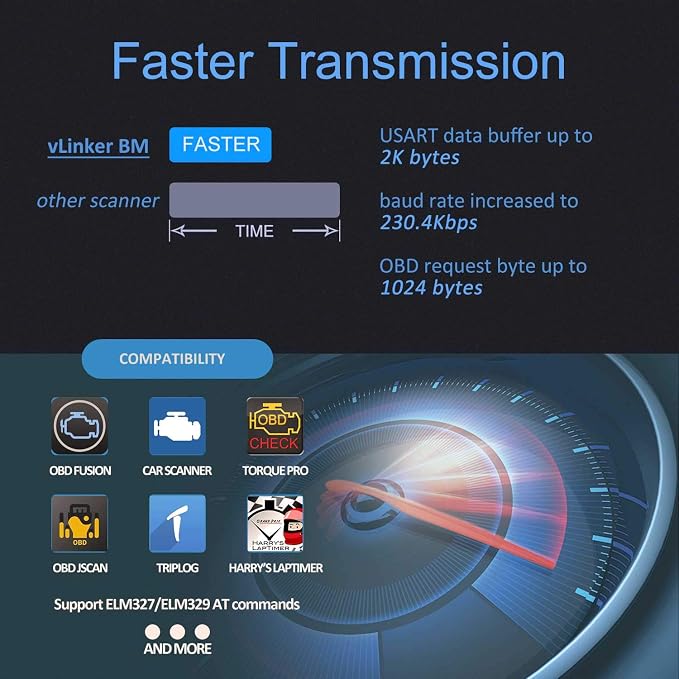
- Compatible with all kinds of OBD-II software
- Made for Bimmercode and Bimmerlink
- 200% faster than normal clones
- Backfeeding protection and automatic sleep mode for safety
- Unlocks hidden features on E, F, G, I and R Series
- Supports nearly all BMs and Minis made in 2008 or later and 2019 Toyota Supra
Ubuy-garanti
Oplev bekymringsfri shopping med 100 % originale produkter, PCI DSS-kompatibel betalingssikkerhed, ISO 27001-certificeret databeskyttelse, den hurtigste grænseoverskridende levering, gratis returnering* og sikker emballage på hver ordre.