- Hjemmeside /
- Elektronik /
- Computer Accessories /
- Computer Accessories & Peripherals /
- Input Devices /
- Digital Pens /
- Artisul SP1603 M0610 Pro Graphics Drawing Tab...
0 ratings




Vare #:
94577493
Artisul SP1603 M0610 Pro Graphics Drawing Tablet Battery-Free Stylus Digital Drawing Tablet Compatible with Windows, Mac, and Android
Vare #:
94577493
DKK 2618
Price Details
Excluding Shipping & Custom charges ( Shipping and custom charges will be calculated on checkout )
*All items will import from USA
0 ratings
Skriv en anmeldelse
På lager
 Importeret fra USA butik
Secured transaction
Ubuy works hard to protect your security and privacy. Our advanced payment security system ensures confidentiality by encrypting your information during transmission using AES (Advanced Encryption Standards) and SSL (Secure Socket Layer) protocols. Your payment details are 100% secure as we do not share your payment details with third party sellers.
Vores bedste logistikpartnere


Artisul drawing tablet provides big space for drawing, easy to use, and perfect for beginner artists.
Denne pakke indeholder 2 elementer


Buy Now Pay Later

Fast
Shipping

Free
Return*

Secure Packaging

100% Original Products

PCI DSS Compliance

ISO 27001 Certified


Note: Step Down Voltage Transformer required for using electronics products of USA store (110-120). Recommended power converters Køb nu.


What Stands Out
Battery-Free Stylus
Enjoy a seamless drawing experience with the battery-free stylus that eliminates the need for charging, providing unlimited creativity without interruptions.
Cross-Platform Compatibility
Designed to work flawlessly with Windows, Mac, and Android devices, ensuring that artists can create effortlessly across their preferred platforms.
High Precision
Experience remarkable accuracy with advanced pressure sensitivity, allowing artists to achieve intricate details and a natural drawing feel in every creation.
Produktdetaljer
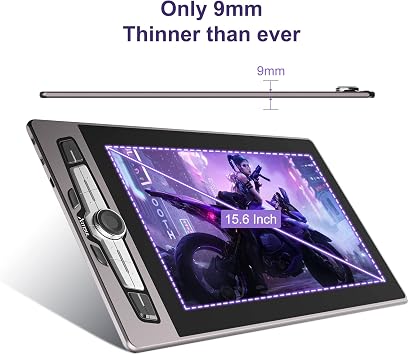
- Large Drawing Space: Artisul drawing tablet provides big space for drawing. Artisul M0610PRO and SP1603 computer graphics tablets are easy to use and no prior knowledge is needed. It's perfect for beginner artists, students, and anime enthusiasts. It is available for both left-handed and right-handed users.
- Upgraded Pen Technology: Battery-free stylus adopts new pressure-sensitive pen technology, which shortens the distance from the pen tip to the display for a precise line positioning to achieve the effect of real pen writing. Features 8192 pressure sensitivity, support ±60° tilt, and 5080LPI handwriting resolution. The ergonomic gravity balance design gives users a professional and comfortable feel, you can easily get smooth and accurate lines.
- Powerful Compatibility:Artisul M0610PRO and SP1603 graphics tablets work well with Windows, MAC, and Android systems. It's convenient and easy to carry around by connecting to an Android phone or tablet. Compatible with Photoshop, SAI, Illustrator, Krita, paint tool sai, manga studio, and more.
- More Efficiently for Creation: Both they with 8 or 14 customizable shortcut keys and a dial, which can individualize workflow and achieve higher efficiency. Easy set up by a cable, no complex cables needed.
| Brand | Artisul |
| Model Name | M0610PRO |
| Built-In Media | Stylus |
| Target Audience | Student, Teacher |
| Model Number | M0610PRO |
| Color | Black |
| Connectivity Technology | USB |
| Pressure Sensitivity | 8192 Levels |
| Operating System | Windows, macOS, Android |
| Additional Features | Stylus |
| Specific Uses For Product | Drawing |
| Compatible Devices | Laptop, Personal Computer |
| Native Resolution | 1920x1080 |
| Active Surface Area | 76.2 square inches (193.5 cm) |
| Special Feature | Stylus |
| Item Weight | 3.5 lbs (1.59 kg) |
Farligt gods
For at undgå forsinkelser i processen for toldbehandling af farligt gods skal forsendelsen åbnes på vores lagerfacilitet for at kontrollere, om de farlige komponenter er skadelige eller ej. Please see the list of Dangerous goods here.
What's in the box
Stylus
Who Should Buy?

-
Digital Artists
Ideal for professional and hobbyist artists seeking a reliable drawing tablet to enhance their digital artwork experience.
-
Graphic Designers
Perfect for graphic designers who require precision and responsiveness in design work across multiple platforms.
-
Students and Learners
Great for students in art courses wanting an affordable, versatile tool to practice their digital drawing techniques.

-
Casual Users
Not suitable for users seeking a simple, low-cost option for occasional sketching without advanced features.
-
Heavy Gamers
Gamers may find limited functionality as this tablet doesn't cater to gaming needs or high-performance gaming requirements.
-
Non-Tech Savvy
Users unfamiliar with digital art tools may struggle with installation and setup, making it less user-friendly.
PRODUKTBESKRIVELSE
Har du nogen forespørgsel? Chat med os
Kundespørgsmal & svar
-
spørgsmål:
What devices are compatible with the Artisul SP1603 M0610 Pro Graphics Drawing Tablet?
svar: The Artisul SP1603 M0610 Pro Graphics Drawing Tablet is compatible with major operating systems, including Windows, Mac, and Android. This broad compatibility allows users from various backgrounds—whether graphic designers, illustrators, or hobbyists—to seamlessly integrate the tablet into their workflow. For instance, a professional designer can use it with a Windows laptop for detailed artwork creation, while students can use it with an Android tablet for notes and sketches on the go. -
spørgsmål:
Does the Artisul SP1603 M0610 come with a battery-free stylus?
svar: Yes, the Artisul SP1603 M0610 Pro includes a battery-free stylus, which means you don’t have to worry about recharging it. This feature ensures a more convenient drawing experience, allowing for longer, uninterrupted creative sessions. Artists can glide across the tablet without the hassle of battery management, making it an excellent choice for those long sketching sessions in studios or at home. -
spørgsmål:
What is the drawing area size of the Artisul SP1603 M0610?
svar: The drawing area of the Artisul SP1603 M0610 is designed to provide ample space for creative expression. It features an expansive workspace, allowing artists to work comfortably on intricate details with precision. This large drawing surface is beneficial for various applications, whether you're creating digital art, designing graphics, or even making animations. A spacious area can enhance the drafting experience, making it feel more natural and instinctive. -
spørgsmål:
Can I use the Artisul SP1603 M0610 for gaming?
svar: While the Artisul SP1603 M0610 Pro is primarily designed for digital drawing and design, it can also be utilized for creating custom graphics in gaming. Artists can use the tablet to design characters, environments, or even promotional materials for their games. The precision of the battery-free stylus can enhance the creativity and quality of designs, making it a valuable tool for both game developers and artists involved in game production. -
spørgsmål:
Is the Artisul SP1603 M0610 suitable for beginners?
svar: Absolutely! The Artisul SP1603 M0610 Pro is an excellent choice for beginners due to its intuitive design and user-friendly features. The tablet allows new artists to explore digital drawing without feeling overwhelmed. With various customization options and compatibility with popular graphic software, learners can easily transition their skills from traditional to digital art, honing their craft with confidence. -
spørgsmål:
What kind of software can I use with the Artisul SP1603 M0610?
svar: The Artisul SP1603 M0610 is compatible with a wide range of graphic software applications, including Adobe Photoshop, CorelDRAW, and other drawing and design programs. This flexibility enables users to choose the software that best fits their skills and artistic needs. Whether you're into photo editing, vector graphics, or digital painting, you can easily set up and start creating your projects right away. -
spørgsmål:
How does the resolution of the Artisul SP1603 M0610 affect my drawings?
svar: The resolution of the Artisul SP1603 M0610 greatly influences the detail and quality of your drawings. A higher resolution means more precision and clarity, allowing for intricate details to be captured in your artwork. For example, artists can create stunning visuals with varying brush strokes and textures, resulting in professional-grade outputs. It's ideal for artists aiming for high-quality projects or those specializing in detailed illustrations. -
spørgsmål:
What is the pressure sensitivity of the Artisul SP1603 M0610?
svar: The Artisul SP1603 M0610 boasts impressive pressure sensitivity levels, allowing for a natural drawing experience akin to traditional media. This feature enables artists to create artwork with varying line thickness and opacity based on the pressure applied to the stylus. It’s especially beneficial for those involved in digital painting, where nuances in stroke are crucial for achieving lifelike textures and compositions. -
spørgsmål:
Does the Artisul SP1603 M0610 require any additional drivers or software?
svar: Yes, the Artisul SP1603 M0610 might require specific drivers or software installations to ensure full functionality with your computer or device. Users can easily download these from the official Artisul website. Once installed, you can customize settings like pressure sensitivity and button functions, enhancing your overall experience. This makes it adaptable for various artistic styles and preferences. -
spørgsmål:
Where can I buy the Artisul SP1603 M0610 Pro Graphics Drawing Tablet in Denmark?
svar: You can purchase the Artisul SP1603 M0610 Pro Graphics Drawing Tablet from Ubuy in Denmark. Ubuy offers a wide selection of products and often provides exclusive deals, ensuring a convenient shopping experience for customers. This platform's user-friendly interface allows for easy browsing and secure transactions, making it a reliable choice for acquiring your digital drawing tablet.
Artisul Digital Pens M0610PRO Editorial Review
Ingen redaktionelle anmeldelser fundet
Customer Reviews & Ratings
1 kundebedømmelser
-
5 stjerne
100%
-
4 stjerne
0%
-
3 stjerne
0%
-
2 stjerne
0%
-
1 stjerne
0%
Anmeld dette produkt
Del dine tanker med andre kunder
Fordele
- Battery-free stylus convenience
- Compatibility with multiple devices
- High sensitivity and accuracy
- Lightweight and portable design
- User-friendly setup and interface
Ulemper
- Limited customizable shortcut keys.
Produktets prishistorik
Vigtig information
- Begrænsninger : ved produkter som forsendes internationalt skal du venligst være opmærksom på, at eventuelle garantier fra producenten ikke nødvendigvis gælder; producentens tjenester vil måske ikke være tilgængelige; produktmanualer, instruktioner og sikkerhedsoplysninger vil måske ikke findes på destinationslandets sprog. Produkterne samt tilhørende materialer vil måske ikke være designet i overensstemmelse med destinationslandets nationale standarder, specifikationer og krav til mærkning; og produkterne lever ikke nødvendigvis op til destinationslandets standarder for spænding og strøm (hvilket betyder, at en adapter eller omformer kan være nødvendig). Køber er ansvarlig for at sikre, at produktet kan importeres på lovlig vis til destinationslandet. Ved køb hos Ubuy eller Ubuys filialer er køberen officiel importøt og skal følge alle destinationslandets love og regler.
- Det er ikke alle de produkter som vises på Ubuy som er til salg, idet Ubuy er en global søgemaskine. Produkterne er underlagt eksport-/handelsregler.
DKK 2618
Bestil nu og få den omkring Onsdag, Juni 24
This item is not restrict in my country.(Please click on above link if this item is not restrict in your country, So our team will review and allow.)
QTY:
Secured transaction
Ubuy works hard to protect your security and privacy. Our advanced payment security system ensures confidentiality by encrypting your information during transmission using AES (Advanced Encryption Standards) and SSL (Secure Socket Layer) protocols. Your payment details are 100% secure as we do not share your payment details with third party sellers.
Vores bedste logistikpartnere
Fastest cross-border delivery
Egenskaber og fordele
- Large drawing area for creativity and precision.
- Battery-free stylus with advanced pressure sensitivity.
- Compatible with Windows, Mac, and Android devices.
- Suitable for both left-handed and right-handed users.
- 8 or 14 customizable shortcut keys enhance workflow.
- User-friendly setup with simple cable connection.