0 ratings


Vare #:
69355953
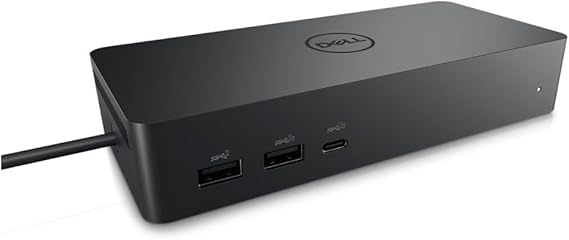
Dell DELL-UD22 UD22 Universal Dock, Black
Vare #:
69355953
DKK 1548
Prisdetaljer
Eksklusive forsendelses- og toldgebyrer ( Forsendelses- og toldgebyrer beregnes ved checkout )
*Alle varer importeres fra US
0 ratings
Skriv en anmeldelse
På lager
 Importeret fra USA butik
Bestil nu og få den omkring Sunday, September 20
Sikker transaktion
Ubuy arbejder hårdt for at beskytte din sikkerhed og dit privatliv. Vores avancerede betalingssikkerhedssystem sikrer fortrolighed ved at kryptere dine oplysninger under transmission ved hjælp af AES (Advanced Encryption Standards) og SSL (Secure Socket Layer) protokoller. Dine betalingsoplysninger er 100% sikre, da vi ikke deler dine betalingsoplysninger med tredjepartssælgere.
Vores bedste logistikpartnere


Create a productive workstation with increased flexibility

Køb nu, betal senere

Hurtig
levering

Gratis
returnering*

Sikker emballering

100 % originale produkter'

PCI DSS Compliance

ISO 27001 Certified




Note: Step Down Voltage Transformer required for using electronics products of US store (110-120). Recommended power converters Køb nu.


Hvad der skiller sig ud
Versatile Connectivity
The Dell Universal Dock UD22 supports multiple device connections, offering HDMI, USB-C, and Ethernet ports, enabling seamless integration with various laptops and peripherals for enhanced productivity.
High-Resolution Support
This dock provides dual 4K display capabilities, ensuring high-resolution performance for graphic-intensive tasks, ideal for professional users seeking superior visual experiences without compromising on speed.
Compact Design
The sleek and compact form factor of the UD22 ensures efficient desk space usage, appealing to users in home offices or collaborative workspaces who value aesthetics alongside functionality.
Produktdetaljer
| Hardware Interface | HDMI, USB 3.0 Type A |
| Compatible Devices | Monitors |
| Total Usb Ports | 6 |
| Number of Ports | 10 |
| Total Number of HDMI Ports | 1 |
| Wattage | 130 |
| Item Dimensions L x W x H | 6.54"L x 1.26"W x 2.99"H (16.6 x 3.2 x 7.6 cm) |
| Item Weight | 14.7 ounces (416.75 grams) |
| Color | Black |
| Brand | Dell |
| Number of Items | 1 |
| Number of Packs | 1 |
| Unit Count | 1 Count |
| UPC | 884116431442 |
| Manufacturer | Dell Computers |
| Built-In Media | Item |
| Model Number | Dell-UD22 |
| Mfr Part Number | 210-BEXR |
| Total USB Ports | 6 |
| Product Dimensions (L x W x H) | 6.54"L x 1.26"W x 2.99"H (16.6 x 3.2 x 7.6 cm) |
| Total HDMI Ports | 1 |
Hvem bør købe?

-
Remote Workers
Ideal for remote workers needing multiple connections for monitors and peripherals, enhancing productivity and workspace organization.
-
Gamers
Great for gamers who require multiple display options and peripheral connectivity for an immersive gaming experience.
-
Content Creators
Perfect for content creators who need to connect various devices and displays for multitasking during editing and production.

-
Minimalists
Not suitable for users who prefer a minimal setup, as it adds multiple connections and devices to their workspace.
Produktbeskrivelse
Dell DELL-UD22 UD22 Universal Dock, Black
Har du spørgsmål? Chat med os
Kundespørgsmål og svar
-
spørgsmål:
What devices are compatible with the Dell Universal Dock UD22?
svar: The Dell Universal Dock UD22 is compatible with a wide range of devices including Dell laptops, as well as other brands supporting USB-C and Thunderbolt 3 connections. It is particularly beneficial for users with ultrabooks and 2-in-1 devices. This dock provides multiple ports, including HDMI, DisplayPort, and USB-A, which makes it a versatile accessory for both home and office setups, allowing for a seamless connection to external monitors, peripherals, and network systems. -
spørgsmål:
How do I set up the Dell Universal Dock UD22?
svar: Setting up the Dell Universal Dock UD22 is straightforward and requires just a few simple steps. Start by connecting the dock to a power source, then connect your laptop using a USB-C or Thunderbolt 3 cable. Afterward, plug in your monitors and peripherals to the appropriate ports on the dock. The dock usually auto-configures itself, making it easy to extend your display or connect additional devices without any complicated setup. This is especially helpful for multitasking professionals who need a stable and efficient workspace. -
spørgsmål:
Can I use multiple monitors with the Dell Universal Dock UD22?
svar: Yes, the Dell Universal Dock UD22 supports multiple monitor setups. Thanks to its array of video outputs, you can connect two external displays simultaneously via HDMI and DisplayPort. This is ideal for users who require enhanced productivity and wish to work on multiple applications side by side. For instance, graphic designers or data analysts can benefit significantly from expanded screen real estate, allowing for easier access to tools and documents. -
spørgsmål:
Does the Dell Universal Dock UD22 provide power delivery to laptops?
svar: Absolutely, the Dell Universal Dock UD22 offers power delivery capabilities, enabling it to charge your connected laptop while in use. This feature eliminates the need for multiple chargers and helps keep your workspace tidy. Users with high-performance laptops will find this particularly advantageous as it allows for uninterrupted usage, especially during intensive tasks like video editing or gaming. You can stay productive without worrying about battery life. -
spørgsmål:
Is the Dell Universal Dock UD22 suitable for gaming?
svar: While the Dell Universal Dock UD22 is primarily designed for office and productivity use, it can also be used for gaming, particularly with laptops that support gaming graphics. Users can connect their devices to a monitor for improved graphics display and performance. However, keep in mind that performance might vary based on your laptop's hardware capabilities; it works best when paired with devices that have robust processing power and high-refresh-rate monitors. -
spørgsmål:
What type of cables are included with the Dell Universal Dock UD22?
svar: The Dell Universal Dock UD22 generally comes with a power adapter and a USB-C cable. These components are essential for connecting the dock to your laptop and powering it properly. Depending on the package, you may also need to use additional cables for connecting your monitors or peripherals. Users often find that having extra HDMI or DisplayPort cables on hand can enhance their connectivity options, ensuring they can set up their workspace as they prefer. -
spørgsmål:
How does the Dell Universal Dock UD22 enhance my productivity?
svar: The Dell Universal Dock UD22 significantly enhances productivity by allowing multiple connections simultaneously, transforming your laptop into a comprehensive workstation. With its various ports for displays, USB devices, and networking, you can work with multiple screens and tools. For instance, professionals who deal with large spreadsheets or design software can efficiently manage their work environment, thereby streamlining workflows and minimizing time wasted on switching between applications. -
spørgsmål:
Can I use the Dell Universal Dock UD22 with an older laptop model?
svar: Yes, the Dell Universal Dock UD22 can be used with older laptops, provided they have compatible ports, such as USB-C or Thunderbolt 3 connections. If your older laptop does not support these ports, alternative methods like USB-A adapters can sometimes facilitate connection, though functionality may be limited compared to newer models. This adaptability makes the dock a versatile choice for users transitioning from older to newer laptops or those with mixed tech environments. -
spørgsmål:
What are the dimensions of the Dell Universal Dock UD22?
svar: The Dell Universal Dock UD22 typically has compact dimensions that make it easy to fit into any workspace without clutter. It is designed to occupy minimal desk space while providing extensive connectivity options. This is particularly important for users who may have limited desk space or need to frequently rearrange their work environment. With its sleek design, it complements both home offices and formal office settings seamlessly. -
spørgsmål:
Where can I buy Dell Universal Dock UD22 Black in Denmark?
svar: You can purchase the Dell Universal Dock UD22 Black from Ubuy, a reliable online retailer that offers a wide selection of electronic products. Ubuy frequently provides detailed product descriptions and user reviews, making it easier for you to make an informed purchasing decision. Plus, with various shipping options, Ubuy ensures that you can conveniently obtain your ideal tech accessories from the comfort of your home.
Dell Docking Stations Dell-UD22 Editorial Review
Dell DELL-UD22 UD22 Universal Dock, Black is an essential accessory for modern laptops with limited ports, providing an array of connectivity options including HDMI, USB-C, and RJ-45 gigabit ports. Users have praised its ability to connect multiple computers seamlessly to monitors, showcasing its versatility for both Windows PCs and MacBook systems. The dock's impressive power delivery capability, offering up to 96W via USB-C, further enhances its utility in professional and home environments. Although some users mentioned intermittent connectivity issues with peripherals like mice and speakers, the overall consensus is that this dock offers a practical solution to expand connectivity and efficiency.
Kundeanmeldelser & vurderinger
1 kundebedømmelser
-
5 stjerne
100%
-
4 stjerne
0%
-
3 stjerne
0%
-
2 stjerne
0%
-
1 stjerne
0%
Anmeld dette produkt
Del dine tanker med andre kunder
Fordele
- Multiple connectivity options including HDMI and USB-C ports
- Seamless connection for dual computer setups
- Provides adequate power delivery for laptops
- Compact design fits easily into any workspace
- Durable build quality ensures longevity
Platformstillid & Køberens Tillid

JG
Jazz
Verificeret køber
“Easy to use and always helpful and sorts any issues I've had past and present”
1 September 2026 · via Trustpilot
EK
Emmanuel
Verificeret køber
“I always receive support when I engage customer service. Overall my experience with UBUY has been top notch. Keep up the good work.”
31 August 2026 · via Trustpilot
F
fnd
Verificeret køber
“The delivery was fast and the product came undamaged and authentic.”
29 August 2026 · via Trustpilot
LC
Leana
Verificeret køber
“Ubuy is extremely efficient and to order online is an easy process. The verity of products to buy is really unlimited! My order was urgent and I got it on time. The products are great! Thank you Ubuy!”
25 August 2026 · via Trustpilot
HL
Hengo
Verificeret køber
“Fast, convenient and cheap. Great store!”
27 August 2026 · via Trustpilot
Sikker betaling
Global levering
Nem returnering
Originale produkter
Produktets prishistorik
Vigtig information
- Begrænsninger: For produkter, der forsendes internationalt, bemærk venligst, at eventuel producentgaranti muligvis ikke er gyldig; producentens serviceordninger er muligvis ikke tilgængelige; produktmanualer, instruktioner og sikkerhedsadvarsler er muligvis ikke på destinationslandets sprog; produkterne (og det medfølgende materiale) er muligvis ikke designet i overensstemmelse med destinationslandets standarder, specifikationer og mærkningskrav; og produkterne opfylder muligvis ikke destinationslandets krav til spænding og andre elektriske standarder (hvilket kan kræve brug af en adapter eller transformer, hvis relevant). Modtageren er ansvarlig for at sikre, at produktet lovligt kan importeres til destinationslandet. Ved bestilling hos Ubuy eller dets datterselskaber er modtageren importøren og skal overholde alle love og regler i destinationslandet.
- Det er ikke alle de produkter som vises på Ubuy som er til salg, idet Ubuy er en global søgemaskine. Produkterne er underlagt eksport-/handelsregler.
DKK 1548
Bestil nu og få den omkring Sunday, September 20
Dette produkt er ikke begrænset i mit land. (Klik venligst på linket ovenfor, hvis dette produkt ikke er begrænset i dit land, så vil vores team gennemgå det og godkende det.)
QTY:
Sikker transaktion
PCI DSS-kompatibel og ISO 27001:2022-certificeret, med krypteret betaling og fuld køberbeskyttelse på hver ordre
Vores bedste logistikpartnere
Hurtigste grænseoverskridende levering
Egenskaber og fordele
- Dell Universal Dock UD22 supports consistent display across systems
- It has the highest number of ports on a universal dock
Ubuy-garanti
Oplev bekymringsfri shopping med 100 % originale produkter, PCI DSS-kompatibel betalingssikkerhed, ISO 27001-certificeret databeskyttelse, den hurtigste grænseoverskridende levering, gratis returnering* og sikker emballage på hver ordre.