- Hjemmeside /
- Elektronik /
- Computertilbehør /
- Computerkomponenter /
- Single Board Computers /
- ELECFREAKS microbit Retro Makecode Arcade for...
0 ratings





Vare #:
255557825
ELECFREAKS microbit Retro Makecode Arcade for STEM Education, Micro:bit Joystick Programming Learning Machine Supports Remote Control and Creat
Vare #:
255557825
DKK 312
Prisdetaljer
Eksklusive forsendelses- og toldgebyrer ( Forsendelses- og toldgebyrer beregnes ved checkout )
*Alle varer importeres fra US
0 ratings
Skriv en anmeldelse
50+ købt
På lager
 Importeret fra USA butik
QTY:
Bestil nu og få den omkring Sunday, Oktober 04
Sikker transaktion
Ubuy arbejder hårdt for at beskytte din sikkerhed og dit privatliv. Vores avancerede betalingssikkerhedssystem sikrer fortrolighed ved at kryptere dine oplysninger under transmission ved hjælp af AES (Advanced Encryption Standards) og SSL (Secure Socket Layer) protokoller. Dine betalingsoplysninger er 100% sikre, da vi ikke deler dine betalingsoplysninger med tredjepartssælgere.
Vores bedste logistikpartnere


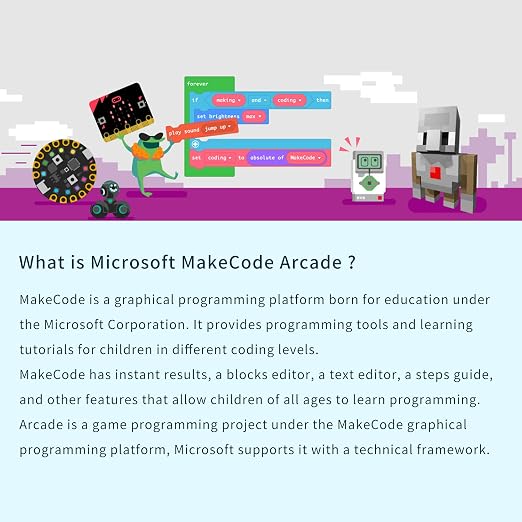
Through Graphical Programming, it is easier for kids to understand and code.

Køb nu, betal senere

Hurtig
levering

Gratis
returnering*

Sikker emballering

100 % originale produkter'

PCI DSS Compliance

ISO 27001 Certified




Note: Step Down Voltage Transformer required for using electronics products of US store (110-120). Recommended power converters Køb nu.


Produktdetaljer
| Compatible Devices | micro:bit V2, Microsoft Arcade programming platform |
| Controller Type | Button Control |
| Additional Features | Graphical Programming, Remote Control |
| Power Source | Battery Powered |
| Item Weight | 0.18 kg |
| Color | Berry |
| Brand Name | EF ELECFREAKS |
| Model Name | micro:bit Retro Arcade |
| Manufacturer | EF ELECFREAKS |
| UPC | 779288989122 |
| Included Components | Cassette |
| Model Number | micro:bit Retro Programming Arcade |
| Manufacturer Part Number | micro:bit Retro Programming Arcade |
Hvad der følger med
Cassette
Produktbeskrivelse
Har du spørgsmål? Chat med os
Kundespørgsmål og svar
-
spørgsmål:
Hvordan shopper man ELECFREAKS microbit Retro Makecode Arcade for STEM online fra Ubuy?
svar: Det er nemt at shoppe ELECFREAKS microbit Retro Makecode Arcade for STEM online fra Ubuy.. Du skal bare søge efter produktet, vælge din forsendelsesmetode, mens du tjekker ud og få det leveret til dit sted. -
spørgsmål:
Er ELECFREAKS microbit Retro Makecode Arcade for STEM tilgængelig til at handle online i Denmark?
svar: Ja, hos Ubuy Denmark er dette produkt tilgængeligt, så du kan handle til en rimelig pris.. ELECFREAKS microbit Retro Makecode Arcade for STEM er ikke tilgængelig lokalt, men du kan stole på os med vores ekspresforsendelsestjenester. -
spørgsmål:
Hvor lang tid tager det at få produktet efter at have afgivet ordren?
svar: Leveringstiden for dit bestilte produkt varierer alt efter, hvad du har bestilt, og den forsendelsesmetode, du har valgt.. Den estimerede leveringstid er nævnt under købsprocessen, så vær ubekymret, mens du handler.
EF ELECFREAKS Single Board Computers micro:bit Retro Programming Arcade Editorial Review
ELECFREAKS microbit Retro Makecode Arcade for STEM Education, Micro:bit Joystick Programming Learning Machine Supports Remote Control and Create Games (Without Micro:bit) is an excellent tool for encouraging programming and gaming skills among students. Designed to work seamlessly with the micro:bit V2 and Microsoft Arcade programming platform, it allows users to engage in graphical programming while enjoying remote control features. The inclusion of a cassette adds a nostalgic touch to the gaming experience. This product has garnered positive feedback for its user-friendly interface and the fun it brings to learning, making it a perfect educational tool for STEM education.
Kundeanmeldelser & vurderinger
57 kundebedømmelser
-
5 stjerne
71%
-
4 stjerne
6%
-
3 stjerne
8%
-
2 stjerne
8%
-
1 stjerne
7%
Anmeld dette produkt
Del dine tanker med andre kunder
Fordele
- Compatible with micro:bit V2 for programming
- Supports remote control features
- Encourages creativity with game design
- Lightweight design for easy handling
- User-friendly for beginners
Ulemper
- Battery not included for operation
Produktets prishistorik
Vigtig information
- Begrænsninger: For produkter, der forsendes internationalt, bemærk venligst, at eventuel producentgaranti muligvis ikke er gyldig; producentens serviceordninger er muligvis ikke tilgængelige; produktmanualer, instruktioner og sikkerhedsadvarsler er muligvis ikke på destinationslandets sprog; produkterne (og det medfølgende materiale) er muligvis ikke designet i overensstemmelse med destinationslandets standarder, specifikationer og mærkningskrav; og produkterne opfylder muligvis ikke destinationslandets krav til spænding og andre elektriske standarder (hvilket kan kræve brug af en adapter eller transformer, hvis relevant). Modtageren er ansvarlig for at sikre, at produktet lovligt kan importeres til destinationslandet. Ved bestilling hos Ubuy eller dets datterselskaber er modtageren importøren og skal overholde alle love og regler i destinationslandet.
- Det er ikke alle de produkter som vises på Ubuy som er til salg, idet Ubuy er en global søgemaskine. Produkterne er underlagt eksport-/handelsregler.
DKK 312
Bestil nu og få den omkring Sunday, Oktober 04
Dette produkt er ikke begrænset i mit land. (Klik venligst på linket ovenfor, hvis dette produkt ikke er begrænset i dit land, så vil vores team gennemgå det og godkende det.)
QTY:
Sikker transaktion
PCI DSS-kompatibel og ISO 27001:2022-certificeret, med krypteret betaling og fuld køberbeskyttelse på hver ordre
Vores bedste logistikpartnere
Hurtigste grænseoverskridende levering
Egenskaber og fordele
- Designed for easy game programming with abundant learning resources.
- Ergonomic grip for a comfortable holding experience.
- High-quality buttons for enhanced handling and control.
- Stunning silk screen design for aesthetic appeal.
- Translucent acrylic case adds a premium feel.
- Ideal STEM educational gift for developing computational thinking skills.
Ubuy-garanti
Oplev bekymringsfri shopping med 100 % originale produkter, PCI DSS-kompatibel betalingssikkerhed, ISO 27001-certificeret databeskyttelse, den hurtigste grænseoverskridende levering, gratis returnering* og sikker emballage på hver ordre.